1. Home
  2. Solutions
  3. Communication & apps
  4. The notification centre: every channel in one place
Communication & apps

The notification centre: every channel in one place

The system tells students, parents and staff about everything that concerns them in the apps and by SMS, email and WhatsApp, from one centre with editable templates and a full log.
Included in: Basic, Professional, Enterprise From EGP 149 per student a year
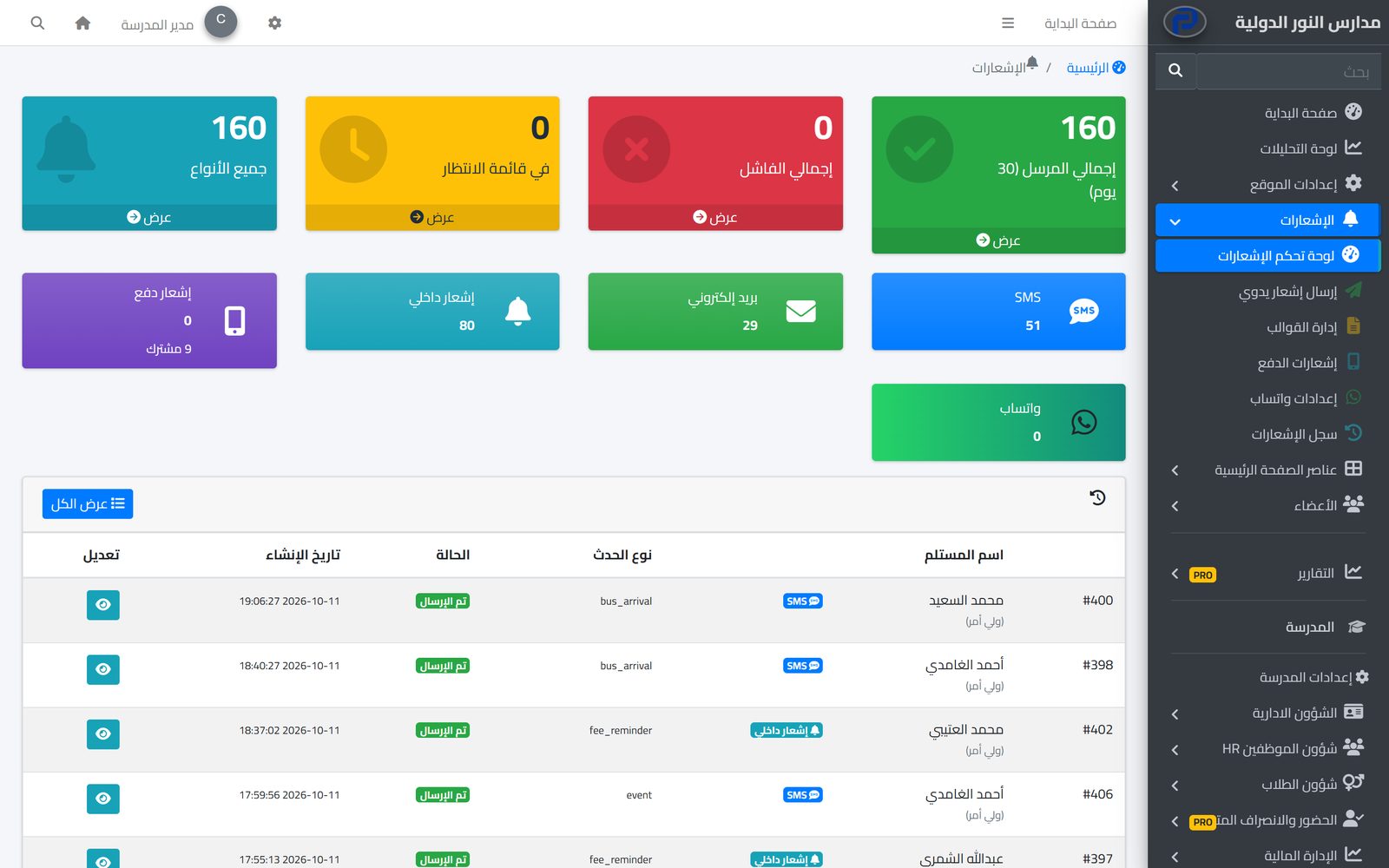
The notifications dashboard in the school admin panel: sent, failed and waiting, counts per channel, and the latest notifications with their status

Overview

A school has many events their owners must hear about on time: an absence, the bus arriving, a clinic visit, new homework, a fee reminder. In Prima Schools these notices all go through one centre that sends them automatically the moment the event is recorded, so nobody has to remember to send them or type them again.

Notices go out on the channels the school turns on: inside the system and the Prima Schools and Prima Staff apps, instant push to phones and browsers, SMS from a provider or the school's own SIM, email, and WhatsApp with its add-on. Every event has a template per channel in both languages, which the school edits to match its own tone.

The administration follows it all on one dashboard: how many were sent, failed or are waiting, the split by channel, and a detailed log of every notice with its recipient, channel and status. The office can also send a notice by hand from the admin panel, or an announcement from the phone in Prima Staff to everyone, one group or one class.
What you get

Five channels, one system

In-app notices, instant push to phones and browsers, SMS, email, and WhatsApp with its add-on.

Automatic notices for events

Absence and lateness, bus trip steps, clinic visits, late arrivals and early leaves, new homework, events, fee reminders, messages and decisions on absence excuses.

Editable templates

A template per event and channel in Arabic and English, with placeholders such as the student's name, turned on or off, and searchable.

Manual sending

A notice from the admin panel to students, parents, teachers or administrators, all of them or selected people, on one channel or all.

Announcements from the phone

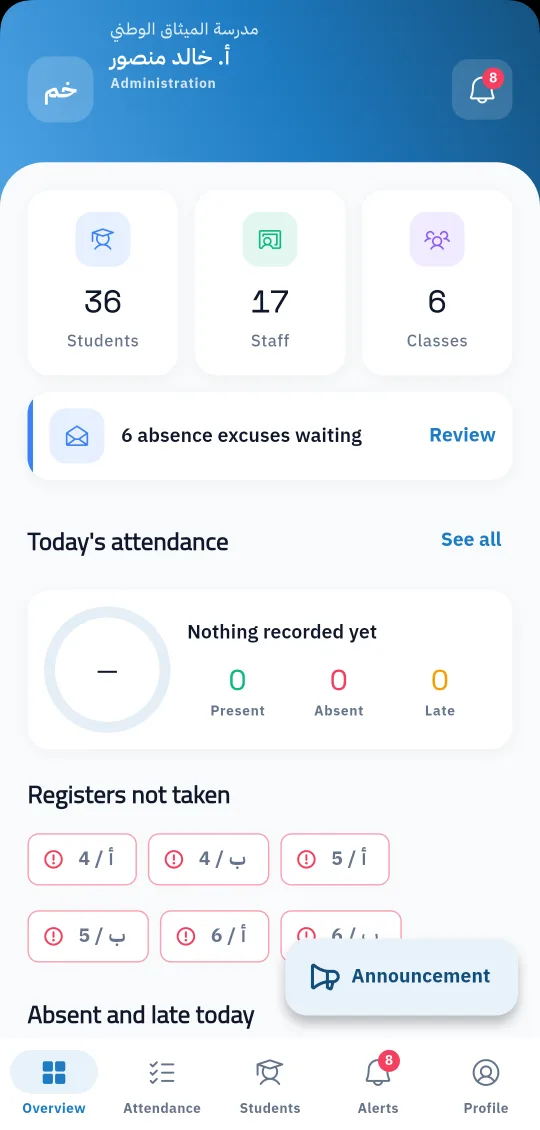
The office sends an announcement from Prima Staff to everyone, students, parents, staff or one class, optionally on every channel.

A notification centre in the apps

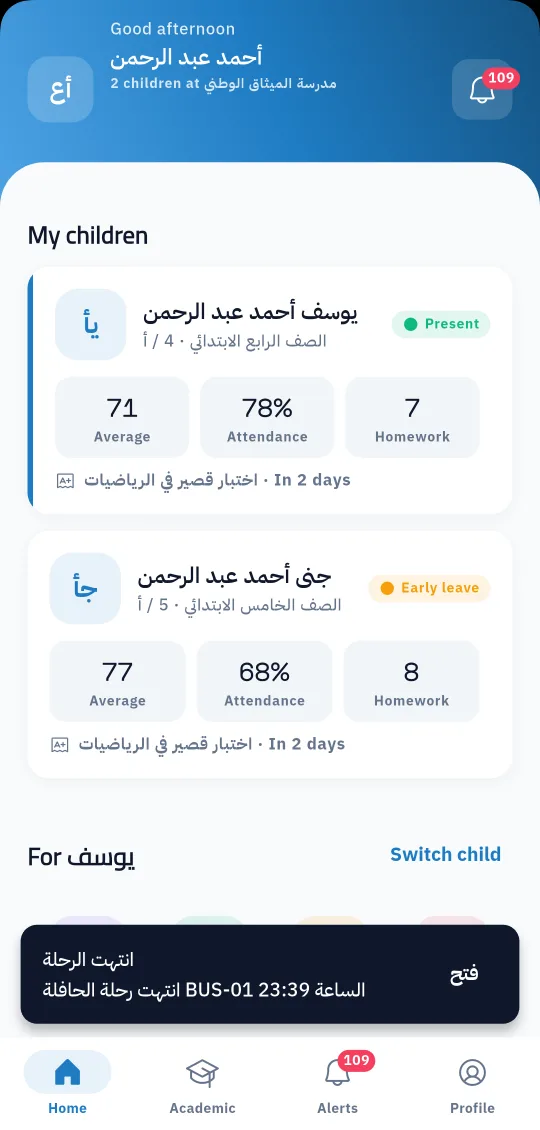
Users see their notices in the app with the unread count, and mark them all read with one tap.

A dashboard

Total sent in the last 30 days, failed, waiting in the queue, and the number sent on each channel.

A full log of every notice

Recipient, event, channel, status and date, filtered by channel, status, event type and period, with the details of any notice.

Queue and test sends

A page for notices waiting to go out, and a test notice to one user on a chosen channel to check the settings before relying on them.

A bus-trip-ended notification reaching a parent in the Prima Schools app, with the unread count
The administration screen in Prima Staff with the announcement button

Who it helps

For the administration

Regular contact with every family without daily effort, and a log that shows what was sent, when and to whom.

For parents

They hear about their child on time, on a channel that reaches them.

For teachers

The attendance and homework they record reach students and parents automatically, with no messages to write.

How it works

  1. 1
    Turn on the channels

    Choose an SMS provider or the school's SIM, set up email, and WhatsApp if you add it.

  2. 2
    Review the templates

    Edit the text of each event per channel and language, or use the ready templates.

  3. 3
    Let the system send

    Notices go out with every event, and you follow the result on the notifications dashboard and log.

Communication & apps

Frequently asked questions

All questions
Which channels does the system use?

In-app and in the mobile apps, instant push to phones and browsers, SMS, email, and WhatsApp with its add-on.

Can we change the wording of notices?

Yes, every event has a template per channel in Arabic and English that the school edits and turns on or off.

Are notices sent automatically?

Yes, when the event is recorded in the system, such as an absence, the start of a bus trip or a clinic visit.

Can we send a notice to a group by hand?

Yes, from the admin panel to a whole group or selected people, or as an announcement from Prima Staff to one class or a whole group.

How do we know a notice was sent?

Every notice is logged with its status, channel and date, and the log can be filtered and each notice opened in detail.

Are SMS messages free?

SMS needs credit from Prima Schools SMS bundles or a provider account, or goes out from the school's own SIM at the cost of its plan.

Ready to try Prima Schools at your school?

Create your account and start a trial, or book a live demo with our team.

No credit card required14-day free trial