Written in the teacher app
Teachers create the exam, write its questions and publish it in Prima Staff, or in the admin panel.
Teachers set the exam from their phone, students take it in the app against the clock, and choice questions are marked automatically.
Frequent short tests show a student's level early, but printing and marking them by hand eats the teacher's time. In Prima Schools teachers build the online exam in the Prima Staff app or the admin panel: the subject, the classes, the start and end time, the length in minutes and how many questions each student gets.
Teachers write choice questions with the right answer, or written questions with a model answer, add a picture to a question, or import ready, approved questions from the question bank. Students take the exam once in the Prima Schools app, with questions picked at random for them and a time limit counted by the server, not the student's device.
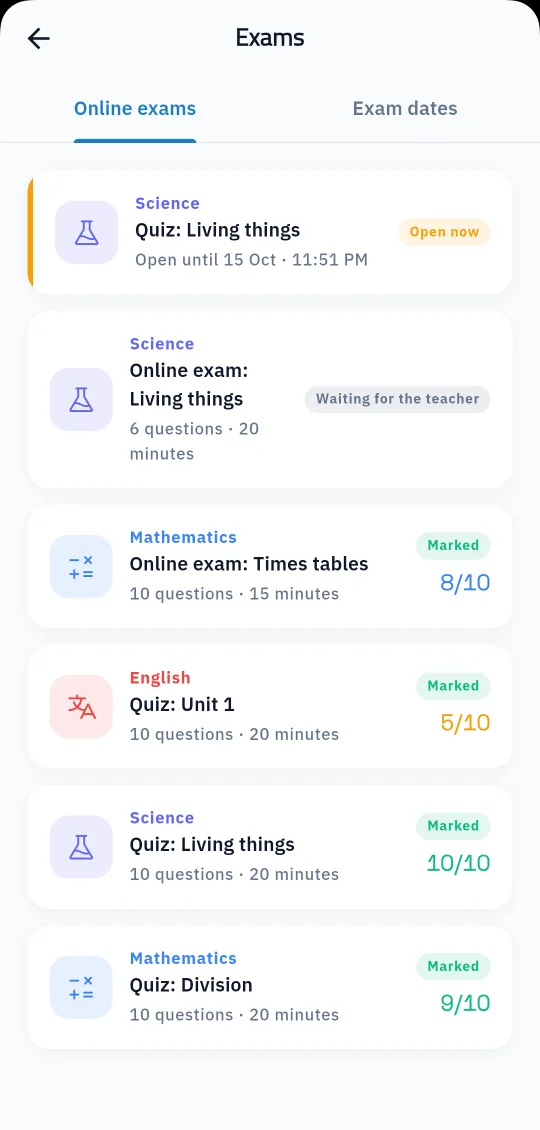
Choice questions are marked automatically on hand-in, and written answers wait for the teacher, who reviews them, gives the marks and approves the result. When the school allows results to be shown, students and parents review the exam question by question. The system also holds the dates of paper exams, and students are told about each one and see it in the app.
Set the subject, classes, window and length, and write questions or import them from the bank.
With random questions, a time limit and one attempt.
Choice questions are marked automatically; the teacher marks written answers and approves the result.
Yes, in Prima Staff: write questions or import them from the question bank, then publish.
Choice questions are marked automatically; the teacher marks written questions and approves the result.
You can set how many questions each student gets, and they are picked at random from the exam's questions.
No, each student has one attempt, and the time is counted on the server.
Yes, they see their child's exams and results, and the answer review if the school shows it.
Yes, exam dates are recorded, students are told about them, and they show in the app.
Create your account and start a trial, or book a live demo with our team.