1. Home
  2. Solutions
  3. Platform
  4. Security and data isolation
Platform

Security and data isolation

Each school's data in its own database, app sign-in with tokens unique to each school, an admin activity log and regular backups.
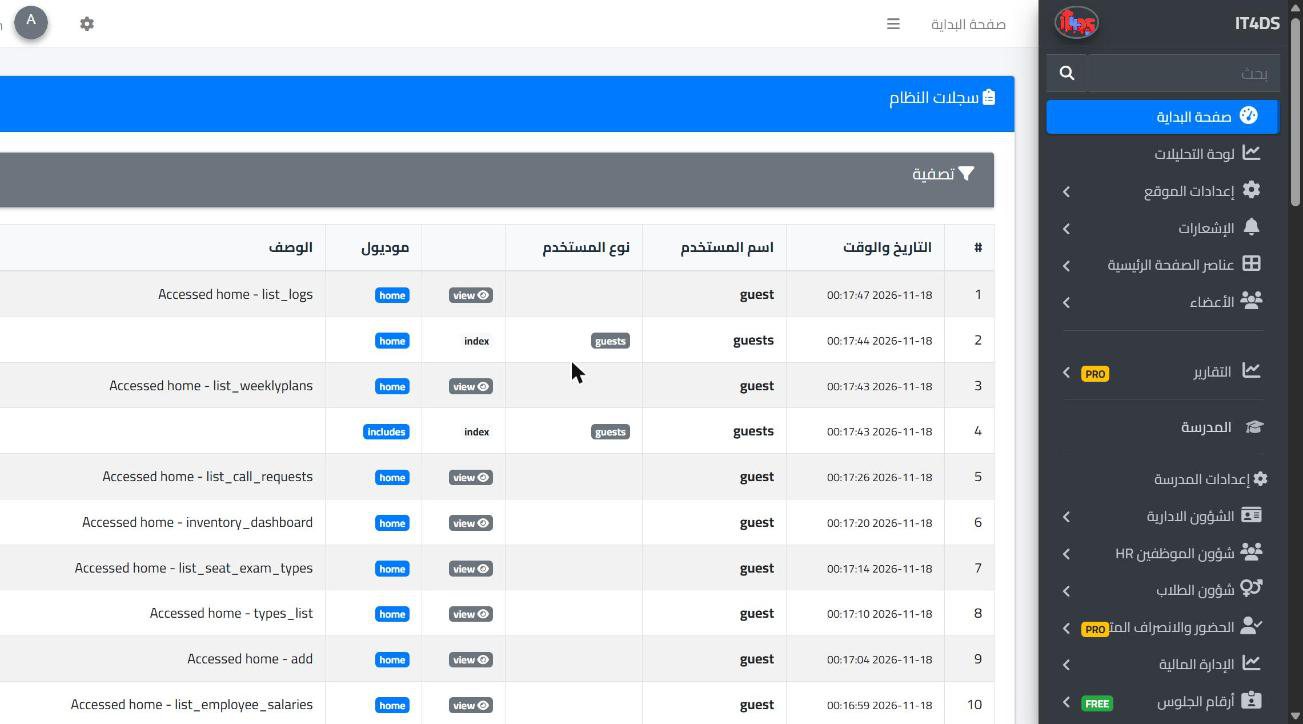
The system log: who opened each page and when

Overview

School data is some of the most sensitive data there is: names and phone numbers of students and parents, attendance, results, health records and payments. That is why Prima Schools is built so that every school is fully separate from the others, not a shared table with other schools.

Each school has its own database and its own file folder, subdomain and admin panel. App users sign in with a short-lived access token signed with a key unique to their school; it renews automatically and is cancelled on sign-out, and a suspended account is locked out of the apps at once, even if it is signed in. All connections to the website and the apps go over HTTPS.

Inside the school, each user sees only what their group allows, and the system refuses any action that is not allowed. The system logs the pages and actions each user opened in the admin panel with the time and IP address. Server backups are taken daily, weekly and monthly.

What you get

A database per school

Each school's data sits in its own database, shared with no other school.

Separate files per school

Images and attachments the school uploads are kept in a folder of its own.

Sign-in tokens unique to each school

The app access token is short-lived and signed with the school's own key, so it is useless at any other school.

Sessions that renew and expire

The access token lasts one hour, the refresh token changes on every renewal, and sign-out cancels it.

Accounts suspended at once

The system checks the account on every request, so a suspended account is locked out of the apps at once, even if signed in.

A permission for each action

Each user sees and does only what their group allows; everything else is refused.

Admin activity log

The pages and actions each user opened in the admin panel, with time, IP address and device, searchable by user and date.

Encrypted HTTPS connection

The website, admin panel and apps connect over HTTPS.

Regular backups

Daily, weekly and monthly server backups.

Who it helps

For the administration

Peace of mind that the school's data is kept apart, and a record of what each user did in the admin panel.

For parents

Their children's data is seen only by them and authorised school staff, and their app sign-in belongs to their children's school.

When a staff member leaves

Suspending their account locks them out of the apps at once, with no open sign-in left on their phone.

How it works

  1. 1
    Your school is created separately

    With its own database, file folder and domain.

  2. 2
    The administration sets permissions

    For each user group and each action.

  3. 3
    Activity is logged and backed up

    An admin activity log, and regular server backups.

Platform

Frequently asked questions

All questions
Is our school's data stored with other schools?

No. Each school has its own database and its own file folder.

Are there backups?

Yes. Server backups are taken daily, weekly and monthly.

What happens if we suspend a staff account?

It is locked out of the apps at once, even if it is signed in on the phone.

Can we see what users did in the admin panel?

Yes. The system logs pages and actions with time and IP address; it does not keep the old and new value of each field.

Is there two-step verification for school accounts?

Not for school accounts at the moment; sign-in is protected by passwords, permissions and session tokens.

Is the connection encrypted?

Yes. The website, admin panel and apps connect over HTTPS.

Ready to try Prima Schools at your school?

Create your account and start a trial, or book a live demo with our team.

No credit card required14-day free trial