1. Home
  2. Solutions
  3. Academics
  4. Smart Timetable
Academics

Smart Timetable

The whole school timetable generated automatically without clashes, then reviewed, edited and printed in one place.
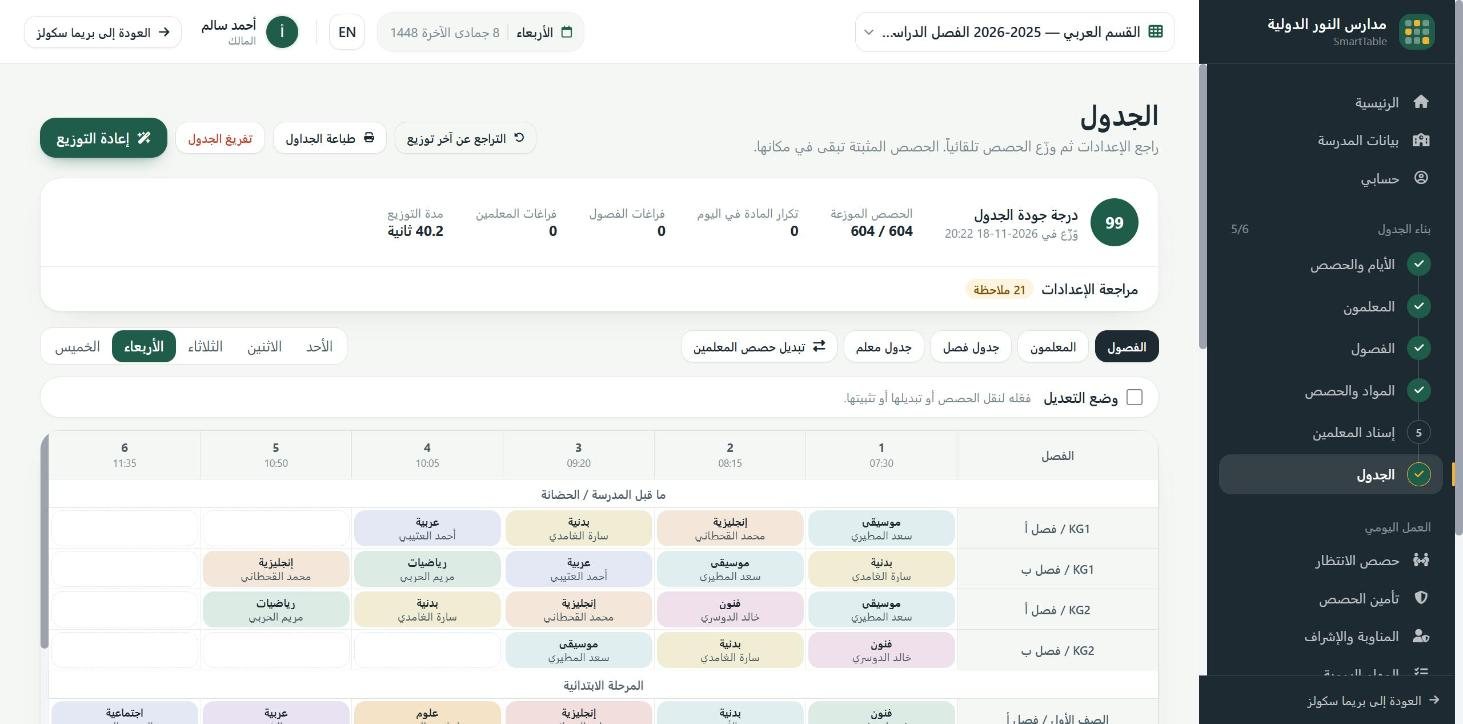
The school timetable after automatic generation: 604 of 604 lessons placed with no teacher or class clashes

Overview

Building a school timetable by hand takes the administration weeks, and usually ends with clashes found in the first week of term. The Smart Timetable builds the whole timetable automatically: it places lessons across classes and teachers, repairs clashes, then improves the result so no teacher teaches two classes at once and no class has two lessons in the same period.

Schools enter their real rules before generating: lab and gym capacity, the times a teacher is not available, part-time teachers, meeting slots, rules for spreading subjects across the week, and double periods. The system checks the data before generating and warns about anything that would block a sound timetable; afterwards any lesson can be moved or swapped with a click, locked in place, and any step undone.

The work does not stop at generation: the system also covers lessons when a teacher is absent and tells the cover teacher, builds the duty roster and exam committees, prints timetables per class, teacher, room and subject, exports to Excel and imports aSc files. The Smart Timetable is free for Prima Schools customers, and the approved timetable is published to the timetable module inside Prima so it reaches students, parents and teachers in the apps.
What you get

Linked to Prima Schools

Opened from the school admin panel with no second login; teachers, subjects, classes, groups and period times come from Prima automatically.

Automatic generation

The whole school timetable built automatically, with clash repair and optimisation after generation.

No clashes

No teacher teaches two classes in the same period, and no class is booked for two lessons at once.

Labs and gyms

Lab, gym and shared room capacity respected when lessons are placed.

Teacher availability

Unavailable times per teacher, part-time teachers, meeting slots, and a weekly early-leave day shared out fairly.

Subject rules and double periods

Rules for spreading each subject across the week, and back-to-back double periods for subjects that need them.

Safe manual edits

Move or swap a lesson with a click and swap suggestions, lock lessons, undo, and restore points.

Checks before generating

Diagnostics before generation that flag missing data and conflicting rules.

Cover, duty and exam committees

Cover lessons when a teacher is absent with a notice to the cover teacher, the duty roster and exam committees.

Print, export and import

Print timetables per class, teacher, room and subject with the school header and principal's signature, export to Excel, and import aSc XML files.

Send to Prima with review and undo

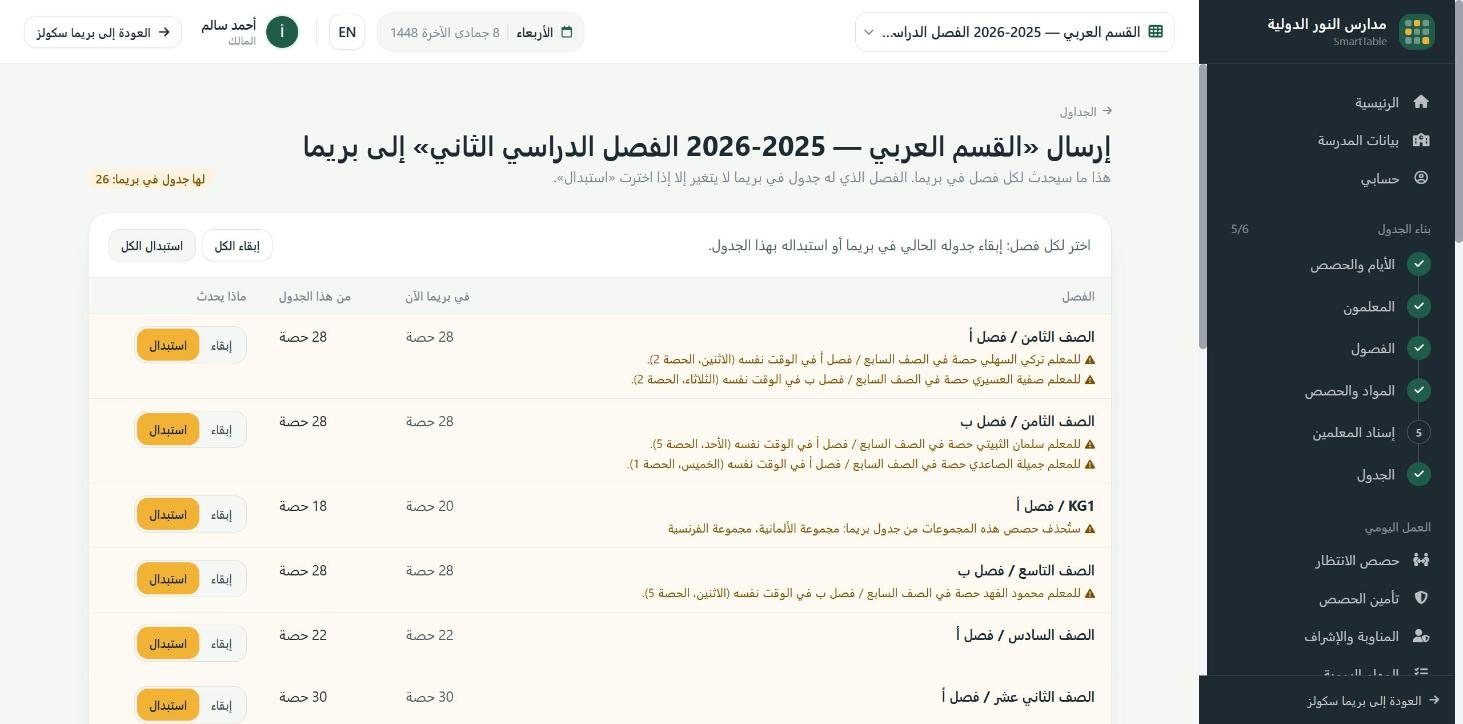
Before sending you see what happens to each class and choose keep or replace for classes that already have a timetable in Prima; Prima keeps a backup, and the last send can be undone.

Parallel lessons and sections

Group lessons taught at the same time, such as German and French, go back to Prima as group lessons; each section has its own timetable, and a teacher shared by two sections never gets two lessons at once.

Reviewing the send to Prima: keep or replace for each class, with warnings
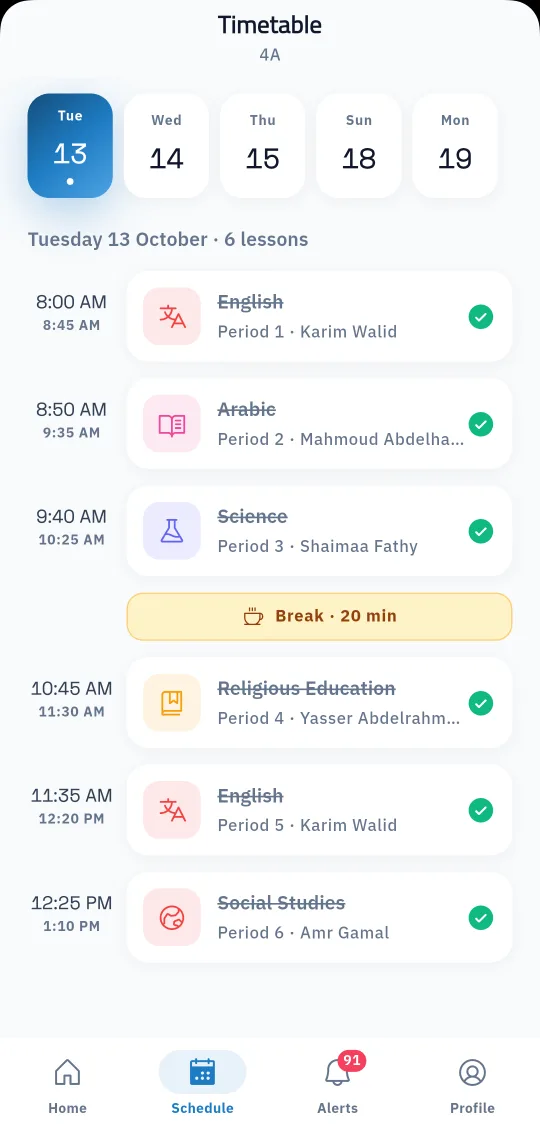
The approved timetable reaches students and parents in the Prima Schools app

Who it helps

For the administration

A complete timetable in a short time instead of weeks of attempts, with the school's real rules and safe edits after generation.

For teachers

A timetable that respects their unavailable times and meetings, and a fair share of cover and duty.

For parents

A stable, clear timetable for their child from the start of the year, in the app.

How it works

  1. 1
    Enter the school's data and rules

    Classes, subjects, teachers and rooms, teacher availability and subject rules.

  2. 2
    Generate and review

    The timetable is built automatically without clashes; change what you want with a click and lock what must stay.

  3. 3
    Approve and publish

    Print or export the timetables, and the approved timetable is published in Prima for students, parents and teachers.

Academics

Frequently asked questions

All questions
Does the Smart Timetable prevent teacher and class clashes?

Yes, no teacher teaches two classes in the same period and no class is booked for two lessons at once.

Can the timetable be edited after generation?

Yes, move or swap lessons with a click, lock lessons, undo any step and go back to an earlier version.

Does it respect teacher availability and labs?

Yes: unavailable times, part-time teachers, meeting slots, and lab and gym capacity.

Can we import a timetable from aSc?

Yes, the Smart Timetable imports aSc XML files.

Can timetables be printed?

Yes, per class, teacher, room and subject with the school header and principal's signature, and exported to Excel.

Do we enter the school's data again?

No. The Smart Timetable takes teachers, subjects, classes, groups and period times from Prima automatically, every time it opens and before every generation.

What happens to the timetable already in Prima?

A class's timetable changes only if you choose Replace for it; Prima keeps a copy of every timetable it replaces, and the last send can be undone.

What does it cost for Prima Schools customers?

The Smart Timetable is free for Prima Schools customers.

Ready to try Prima Schools at your school?

Create your account and start a trial, or book a live demo with our team.

No credit card required14-day free trial