1. Home
  2. Solutions
  3. Communication & apps
  4. The student app: the school day on the phone
Communication & apps

The student app: the school day on the phone

Students see today's lessons, homework and marks in the Prima Schools app, hand in homework and take online exams from their phone, and message their teachers.
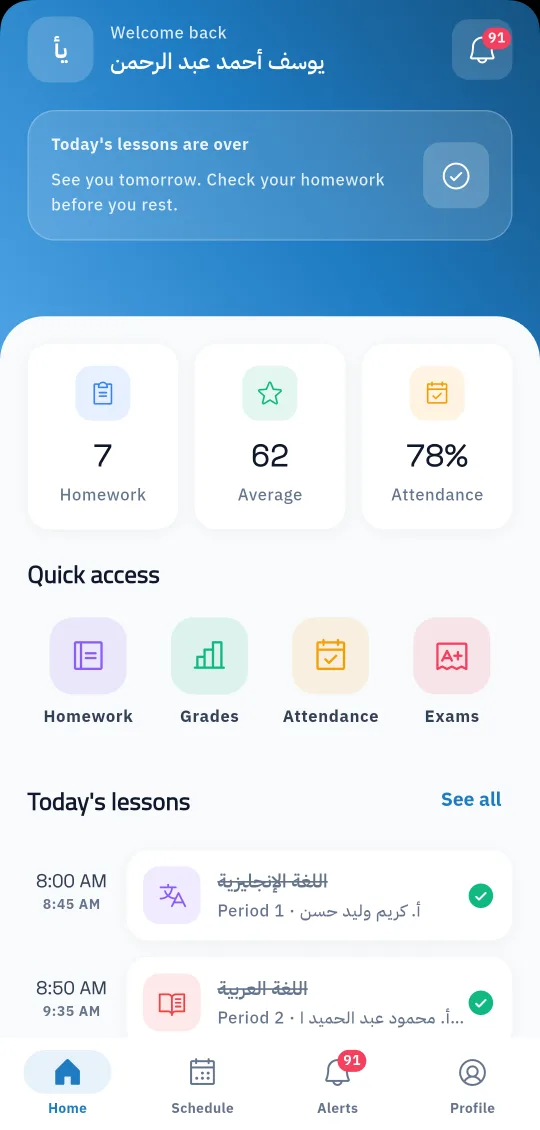
The student home screen in the Prima Schools app: homework, average, attendance rate and today's lessons

Overview

When students open the Prima Schools app, their school day is in front of them: the lesson running now, today's lessons with times and teachers, the homework they still have to do, their average and attendance rate. From the same screen one tap opens homework, marks, attendance and exams.

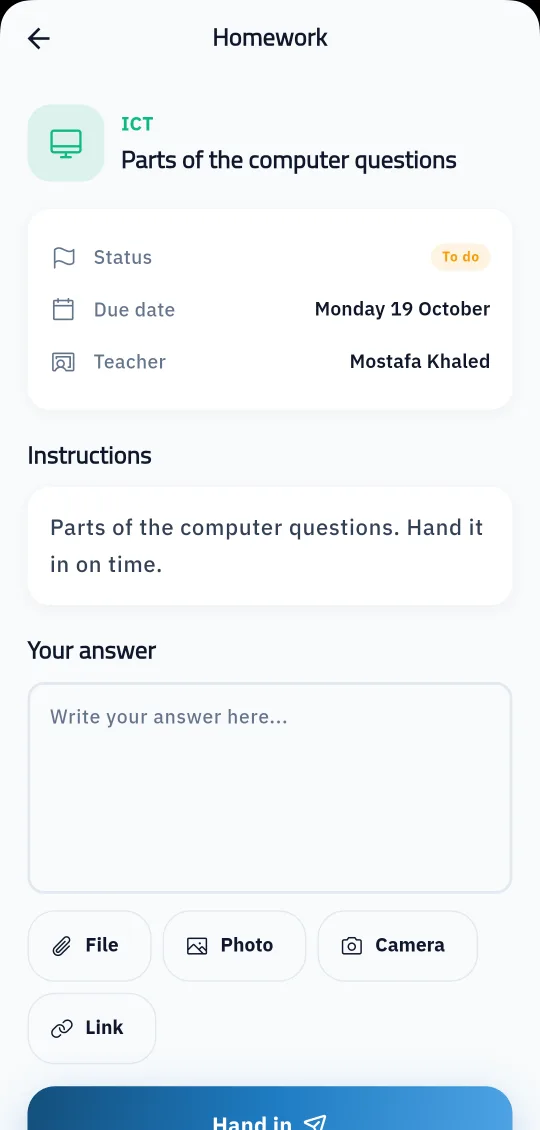
Homework is no longer a sheet lost in the school bag. Students read the teacher's instructions and attachments in the app, write their answer, add a file, a photo from the gallery or the camera, or a link, and hand it in, then see the mark once it is checked. In an online exam they read the instructions first, answer with the timer in view, and the exam is handed in automatically when time runs out.

Students also find their weekly timetable, exam dates and seat number, each subject's material and lesson explanations, the virtual classroom link when the teacher adds one, weekly plans and school events. They message their teachers and the administration from the app, and get notifications about new homework and everything that concerns them.
What you get

Today at a glance

The lesson running now and today's lessons with times, homework to do, average and attendance rate, with shortcuts to the main screens.

Hand in homework from the phone

Students write an answer and add a file, a photo from the gallery or camera, or a link, and follow each piece of homework: to do, submitted or late, then the mark.

Online exams

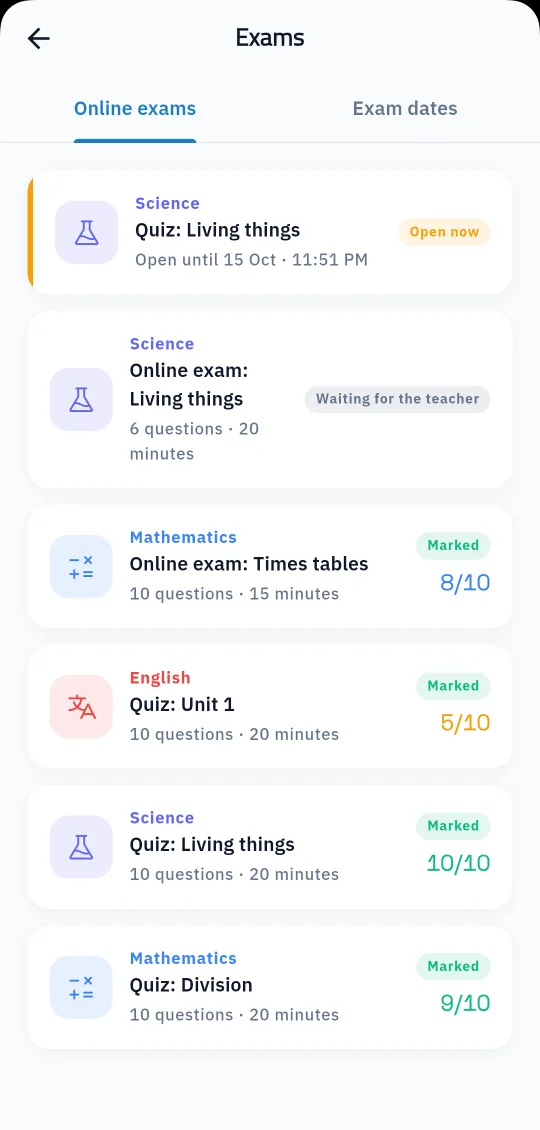
Instructions before starting, one attempt, a visible timer, choice questions and written answers the teacher marks, and automatic hand-in when time is up.

Answers kept if the connection drops

If the exam cannot be handed in because of the connection, the student's answers stay saved on the phone until they try again.

Result and answer review

Students see their mark once the teacher approves it, and review their answers, the correct answers and teacher notes when the school allows it.

Marks and average

Marks per subject, the overall average and online exam results on one screen.

Timetable and exam dates

The weekly timetable, upcoming exam dates, and the seat number and exam room once published.

Subjects and lesson explanations

Each subject's material, files, lesson explanations and weekly plans, plus the virtual classroom join link and access code when the teacher adds them.

Messages and notifications

Message teachers, classmates and the administration, report an abusive message or block its sender, and get instant notifications.

Handing in homework in the app with a written answer and a file, photo or link
The student's online exams with their status and marks, next to the exam dates tab

Who it helps

For students

They know what is due today and what homework is left, and hand in work and take exams from their phone wherever they are.

For teachers

Answers and exams arrive organised in the Prima Staff app, ready to mark, with no papers to collect.

For parents

They see their child's homework, marks and results in their own account, while the child takes exams from the student account.

How it works

  1. 1
    The school creates the student account

    Linked to the student's class, timetable and teachers in the system.

  2. 2
    Students install the app

    From Google Play or the App Store, then enter the school code, username and password.

  3. 3
    The day starts on the home screen

    Lessons and homework are there, work is handed in and exams taken, and notifications bring anything new.

Communication & apps

Frequently asked questions

All questions
Does each student need their own account?

Yes. The school creates a student account separate from the parent account, and both use the same Prima Schools app.

What can students attach to homework?

A written answer with a file, a photo from the gallery, a camera photo or a link.

What if the internet drops during an exam?

The answers stay saved on the phone and the student tries to hand in again; note that the exam time keeps running.

Do students see the correct answers after an exam?

They do when the school allows answers to be shown for that exam, and the result shows once the teacher approves it.

Can students message their teachers?

Yes, they message their teachers, classmates and the administration, and replies come in the same conversation.

Is the app on iPhone and Android?

Yes, on the App Store and Google Play, in Arabic and English.

Ready to try Prima Schools at your school?

Create your account and start a trial, or book a live demo with our team.

No credit card required14-day free trial